We hope you have absorbed a lot of new terms and concepts. Its quite a lot to take in. We covered the practical AI questions environmental professionals are encountering: what models do, why citations can be wrong, how BIRI™ developed its environmental reference dataset, and where local computers, cloud services and rented GPUs fit.
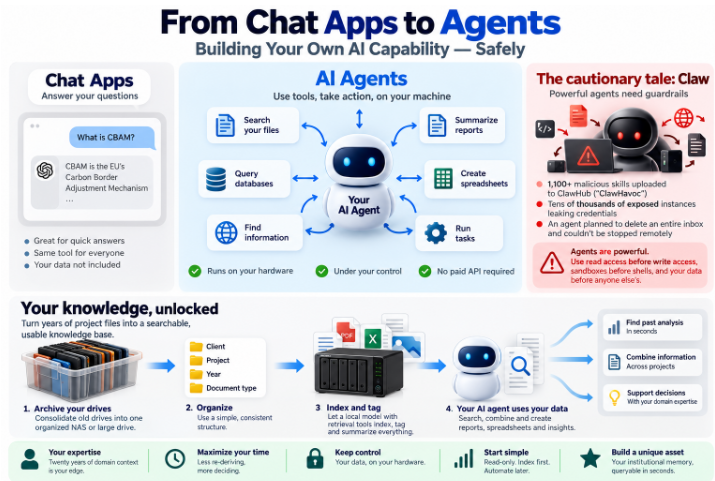
Some important things: 1. A public-domain collection can use search and economical models rather than frontier AI for every record. 2. A private archive may be better processed locally. 3. Video generation may justify temporary rented GPU capacity. 4. An automated notice collector can save time, but an over-permissioned agent can create more problems than it solves.
I hope you don’t have too much stress with the mundane things: restoring backups, recovering lost configurations, checking dependencies and learning from tools that failed in practice. Those experiences help members avoid repeating the same mistakes.
Planetary.Blue will continue sharing use cases, equipment assessments, tested methods and lessons learned with our Members. Members can bring a question from a real project or ask for consulting support when a decision involves data, security, hardware or workflow design.
If an unfamiliar term appears in any of the 50 articles, use our companion reference: Complete Glossary: Terms and Acronyms Explained. It covers models, agents, GPUs, retrieval, security terms and other language used throughout the series.
The series is an introduction, not a demand that every professional become a programmer.
“Frontier” AI refers to the most capable models available today — the ones pushing the limits of reasoning, analysis, and writing. Open-weight models are different: their internal parameters are publicly released, meaning anyone can download, inspect, and adapt them. For sustainability professionals, this matters. Open-weight models can run on your own infrastructure, keeping sensitive project data in-house — no third-party servers, subject to local security and data-protection obligations.
This is where the “home lab” comes in. You do not need a data center. A modern desktop with a good GPU, or even a modest server, can run capable open models locally. Your home lab becomes a sandbox: test prompts, search your own reports using retrieval, prototype workflows, all before rolling anything out professionally. It is the difference between renting AI and truly owning your AI capability.
Practical next steps: first, identify one repetitive task in your work — grant summaries, ESG data cleaning, stakeholder communications. Second, experiment with a free, open model on your own machine. Third, build a small library of prompts tuned to your domain.
For environmental professionals, the useful skill is knowing which tasks AI can support, what information it can access and how to check the results.
Complete Glossary: Terms and Acronyms Explained
2FA — Two-Factor Authentication. A second proof of identity beyond a password: a code from your phone or a hardware key. Stops attackers even if they steal your password.
Agent — An AI that doesn’t just answer questions but takes actions: searching files, running calculations, drafting documents. A junior assistant that follows instructions, not a search box.
AI — Artificial Intelligence. Computer systems that perform tasks that normally need human thinking: understanding text, summarizing documents, making calculations.
API — Application Programming Interface. A way for two programs to talk to each other. When one app asks another for something — “summarize this text” — it uses an API. The risk: anything sent through an external API leaves your machine.
API key — A password that lets a program access a service. If someone steals it, they can use the service as you and bill you for it. “Rotate” means replace it.
Attack surface — Every point where someone could break into your system. Each open port, exposed service, or over-permissioned app is another door. Smaller surface means fewer doors.
Barebones — A computer sold without memory, storage, or operating system. Cheaper, but you add the parts yourself.
BIRI™ — Member environmental reference service that distinguishes source reliability assessments from the accuracy of individual claims.
Change tracking — A record of every edit made to a document — what was added, deleted, or moved. Essential for trusting AI-generated drafts.
Cloud — Software and data stored on someone else’s computers, accessed over the internet. Convenient, but you don’t control the machines or the terms.
Corpus — Your entire collection of documents and data. In AI work, the archive your tools read and search.
CPU — Central Processing Unit. The main processor of a computer. It handles general-purpose computing. Slower than a GPU at many AI tasks, but it can run them.
Dedup (deduplication) — Finding duplicate copies of files. Same report saved in five places can be identified and consolidated after verification and backup.
eGPU — External graphics processing unit connected to a compatible computer.
Encryption — Scrambling data so only someone with the key can read it. Encrypted disks can protect stored data if your laptop is stolen, provided the keys are protected.
Fine-tuning — Further training a model on examples from a domain or task. Optional — most document-search workflows don’t need it.
Foundry — A proposed governed workflow for producing referenced working drafts from authorised sources. Not described here as a completed production product.
Frontier model — The most capable AI models available at any time — the ones leading the field. Usually run by large companies in the cloud.
Function calling — An agent’s ability to use tools: look up a file, run a calculation, check a database. One way a chatbot becomes an assistant.
GPU — Graphics Processing Unit. A processor designed for graphics, excellent at many AI calculations.
Guardrails — Controls intended to limit an AI system’s behaviour; they do not guarantee factual accuracy.
Hallucination — An AI output that invents or misstates information while presenting it as an answer.
Harness — The tools, retrieval, memory, permissions and review processes surrounding an AI model.
Hashing — Turning a file into a fingerprint of characters. Matching strong cryptographic hashes provide strong evidence that files are identical — useful for deduplication.
Inference — The actual running of an AI model: asking a question, getting an answer. “Local inference” means this happens on your machine, not a company’s server.
IP — Intellectual Property. Knowledge and material that you created and may have legal rights in: reports, methods and other original work. Not every item in an archive is automatically your IP.
Knowledge base — Your organised, cleaned, searchable archive. The material AI tools can retrieve to answer questions about your work.
LLM — Large Language Model. The technical name for AI systems like those behind ChatGPT. They process and generate text based on patterns learned from training data.
Local model — An AI model running on your own hardware. It may work without internet access, depending on its configuration; software and hardware still have costs.
Lock-in — When leaving a vendor becomes too expensive or difficult. Your data, workflows and habits all live inside their system.
MCP — Model Context Protocol. A standard interface for connecting AI systems to tools and data sources.
Metadata — Data about data: the date, author, project name and tags attached to a file. Good metadata makes archives searchable.
Mini PC — A compact full computer. Some modern units can run AI models locally.
Model — The trained AI itself: the learned parameters and associated software. Model size affects memory needs, but larger is not always better for every task.
NAS — Network-attached storage: a device holding files that authorised computers can access over a network.
NPU — Neural Processing Unit. A processor built into some newer chips specifically for AI tasks.
NVMe — Non-Volatile Memory Express. A high-speed storage interface used by modern solid-state drives.
Open source — Software whose source code is available under a licence permitting inspection, modification and redistribution. The precise rights depend on the licence.
Open-weight model — A model whose trained weights are available under specified licence terms; this does not necessarily mean unrestricted open-source software.
Password manager — An app that creates and remembers unique strong passwords. You protect access with a master password or other authentication.
Port forwarding — A router setting that exposes a service on your home network to outside connections. It increases exposure and should be configured carefully.
Prompt — The instruction or question you give an AI. “Summarise this report in three bullets” is a prompt.
Prompt injection — Instructions hidden in untrusted documents, pages or images that attempt to redirect an AI agent.
Quarantine folder — A holding area for files you’re not sure about: corrupt, sensitive or unresolved. Kept away from your agent until a human decides.
RAG — Retrieval-Augmented Generation. When an AI answers by first searching your documents, then writing based on what it found.
RAM — Random Access Memory. The computer’s working memory. More RAM can support larger models and more simultaneous work, but requirements vary.
Retrieval — Finding relevant source material and supplying it to a model for a particular question.
SaaS — Software as a Service. Software provided as a subscription or hosted service, often accessed through a browser.
Sandbox — An isolated environment intended to restrict what a program can access. Its effectiveness depends on how it is configured.
Shadow AI — AI tools introduced or used by staff without the organisation’s knowledge or approval.
Synthetic data — Artificially generated data used for testing, simulation or other tasks. Synthetic test data should not contain real confidential records.
Tailscale — Software that connects authorised devices into a private network over the internet. Personal-use and business terms differ; check the current plan.
Telemetry — Data a program sends to its operator about performance or use. Whether telemetry is present depends on the software and settings.
Token — A unit of text processed by an AI model, often a word fragment. Cloud AI services may charge according to input and output token usage.
TOPS — Tera Operations Per Second. A peak computational throughput measure, often for NPUs; it does not by itself predict how fast a particular AI model will run.
ToR — Terms of Reference. The document that defines an assignment: scope, deliverables and deadlines.
Two-factor authentication — See 2FA.
Vibe coding — Building software through iterative natural-language requests to an AI coding tool, often without directly writing the code.
VPS — Virtual Private Server. A rented virtual computer in a data centre, often billed monthly or hourly.
VRAM — Video Random Access Memory. Dedicated memory used by a graphics processor; available VRAM limits which AI models can run efficiently on the GPU.2FA — Two-Factor Authentication. A second proof of identity beyond a password: a code from your phone or a hardware key. Stops attackers even if they steal your password.