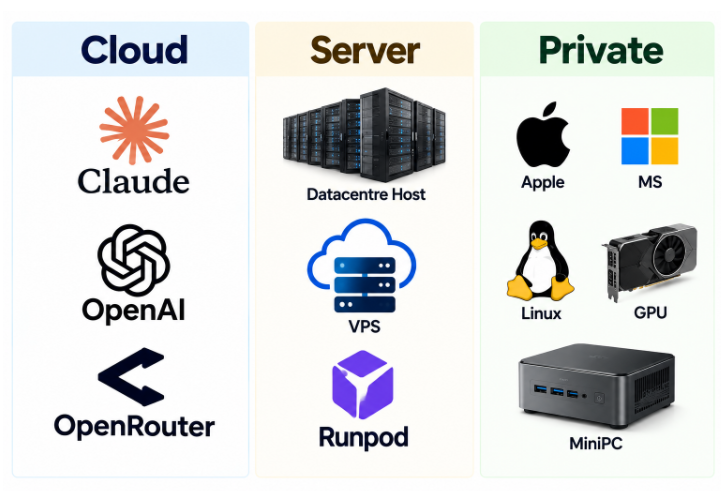
Once your archive is organized and cleaned, you face a real choice: where does your AI actually run? The landscape splits into three doors — Cloud, Server, and Private. Each is right for some jobs and dangerous for others.
Cloud: Claude, OpenAI, OpenRouter. Maximum capability, zero hardware, instant setup. This is the right door for drafting, brainstorming, learning new domains, and code help — work where nothing sensitive is involved. The risk is structural: your prompts leave your building. Even with enterprise agreements, you are renting intelligence from vendors whose incentives are not yours. Rule of thumb: if losing the conversation to a third party would embarrass you or breach a client agreement, it does not go to the cloud. (OpenRouter deserves a note: it is a router to many models — convenient, but you are adding another intermediary who sees everything you send.)
Server: datacenter hosts, VPS, Runpod. You rent a machine — sometimes with serious GPUs — by the hour. Ideal for training runs, big indexing jobs, or testing models too heavy for a mini PC. You keep more control than pure cloud APIs, and your data sits on a disk you configure. But it is still someone else’s hardware, in someone else’s building, and the meter is running. Risk profile: good for batch processing of non-sensitive material, risky for archives and anything confidential, and costs can surprise you if you leave a job running overnight.
Private: Linux box, GPU, mini PC — plus Apple and Microsoft on-device modes. This is the sovereignty door. Your corpus, your model, your network. data can remain local if the system is correctly configured. This is where your deduplicated, organized, cleaned archive belongs — indexed and queried by an agent that has no upstream. Risks? You own the security model, the backups, and the maintenance. A misconfigured local agent can still wreck files (Claw taught us that), so read-only first, always. And capability per dollar is lower than cloud — but for retrieval over your knowledge, local models are already good enough.
How the doors work together. Think tiered, not tribal: cloud for thinking, servers for heavy lifting, private for your IP. Choose the location of each task according to data sensitivity, cost and computing requirements.